01
Tablet job cards
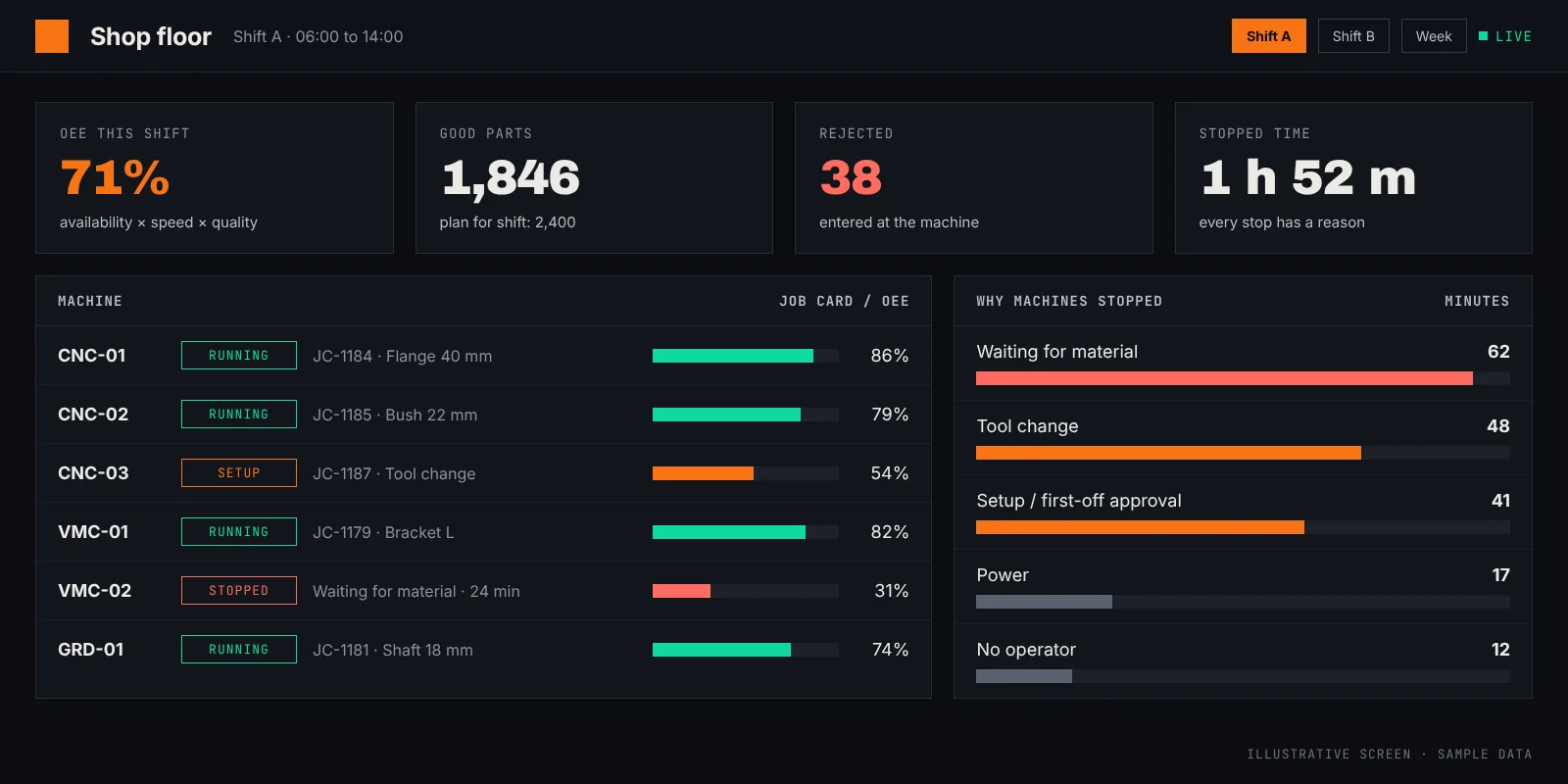
A tablet at each machine shows the operator the job, the drawing and the quantity. Start, stop, good count and rejects are entered with a few taps, in English or Tamil.
An auto-components machine shop in Ambattur Industrial Estate runs fourteen CNC and VMC machines over two shifts. Production is written on paper job cards, typed into Excel the next morning, and discussed after the shift is long over. This is how we would capture the same information at the machine, as it happens.
About this case study. This is a worked example, built from the kind of operation we work in. The business described is a composite and is not a named client, the screens show sample data, and we quote no result figures we cannot source. The commitments at the foot of the page are the ones that hold on every engagement.
The job card travels with the batch. The operator writes the start time, the quantity and the rejects. The supervisor collects the cards at the end of the shift, and a clerk types them into Excel the next morning.
By the time the owner sees that a machine stood idle for an hour waiting for material, the shift is over and the reason is someone's recollection. Rejects are counted at final inspection, a day after the tool wore out. A customer calls to ask where an order is, and the answer needs a walk to the floor.
The plant does not need new machines or a new ERP to fix this. It needs the job card filled in once, at the machine, in a form the whole plant can see.
The exact scope is fixed after two to four days on site. For an operation like this one, it usually comes down to these parts.
A tablet at each machine shows the operator the job, the drawing and the quantity. Start, stop, good count and rejects are entered with a few taps, in English or Tamil.
When a machine stops, the operator picks the reason from a short list: waiting for material, tool change, setup, power, no operator.
On machines where it is worth it, a simple signal from the controller records run and idle time automatically, so the operator only confirms the reason.
A screen on the floor and on the owner's phone with each machine's status, output against plan and OEE for the shift.
Every job card is linked to its work order, so the office can see how far an order has progressed without calling the floor.
The end-of-shift report writes itself from the entries, and goes to the owner and the production head.
| Today | With the system | |
|---|---|---|
| Production numbers | Next morning, from Excel | During the shift, on a screen |
| Why a machine stopped | Asked the next day | Recorded when it happens |
| Rejects | Counted at final inspection | Entered at the machine, per job |
| Where is this order? | A walk to the floor | A search in the office |
| Shift report | Typed by a clerk | Produced by the system |
The same stages on every engagement. The full walk-through is on the How We Work page, and the wider service is described under Manufacturing software and factory AI.
| Discovery call | 30 min, free |
|---|---|
| Days on your floor before a proposal | 2–4 |
| Scope, timeline and price | Fixed |
| First working demo on your data | Week 1 |
| Typical time to production | Weeks 6–12 |
| Existing systems replaced | Zero |
The screens are built around the paper job card they already fill in, with large buttons and Tamil labels where needed. During the on-site days we watch how the card is used today, so the tablet asks for less than the paper did.
No. Tablet entry alone gives live output, rejects and stop reasons. Machine signals are added only where automatic run and idle time is worth the wiring.
It does not have to. The system can run on a server inside the plant and work on the factory network without an internet connection.
Six branches, six Tally files and a weekly Excel sheet. How one live stock position, reorder alerts and branch transfers replace the Monday phone calls.
Read the case study →Bank statements, Tally ledgers and GSTR-2B matched by the system. The accounts team reviews a short list of exceptions instead of ticking thousands of lines.
Read the case study →Sampling one part in fifty lets defects reach the customer. A camera over the line, trained on the plant's own parts, checks every piece and tells the supervisor when rejects start rising.
Read the case study →Tell us what your week looks like. Thirty minutes on a call is usually enough to tell whether there is something worth building together. The call is free, and we respond within one business day.